Got this from WebMonkey.
Having heard quite a bit about ReactOS, I decided take it out for a spin. Vee Dee Eyes became helpful once again by providing a vdi of the latest ReactOS release, 0.3.5.
ReactOS is a very distinct project. Nearly all open source operating systems are basically Unix clones. Be it Linux, OpenSolaris, or FreeBSD. ReactOS goes in a totally different direction by hoping to achieve parity with the Windows platform. The obvious benefit is that it could utilise the gazillions of applications written for the Windows platform. A lot of information on the project is there is the wikipedia article for ReactOS. Very interesting read.
After using ReactOS, I have to say it does feel genuinely Windows like, in both good and bad aspects.
The bad aspect- I encountered a blue screen error within minutes of usage. This has to expected. Not because it emulates Windows, but due to the fact that it is still in very early alpha stage. The good aspect - It feels just like Windows! There are some notable enhancements though. You can add software with a program manager (unimaginatively called Download!) like Synaptic or Yast as in Linux. There are multiple desks as in Linux, which is a real productivity booster. Firefox 1.5 is installed by default, with Firefox 2.0 available to install through Download!
Normal use is nearly impossible since it felt quite flimsy to use. The graphics was getting a bit garbled and there was quite a few issues with screen refresh. As a an early alpha version, this is pretty impressive. The memory footprint is really low and the total download was just around 40 MB as a rar file (uncompressed size - 160 MB).
Is there a chance of ReactOS gaining mass adoption? There are a lot of windows applications in the wild, and a lot of old PCs lying around. Also, if there is a need to run some legacy application, we can always virtualise with ReactOS. Market and the need is out there, with some solid development time put in there is every chance that ReactOS will be a genuine contender in the already crowded OS space.
Hello, Windows 98! Long time no see!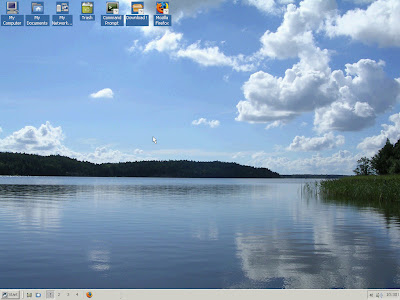
Start Menu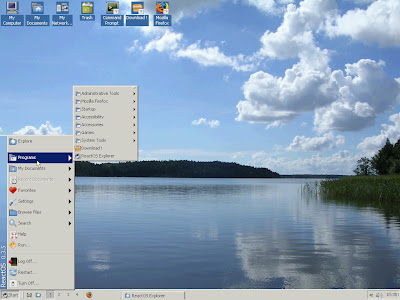
DOS Prompt!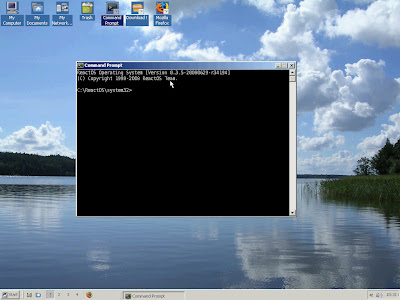
ReactOS Explorer: An enhanced Windows Explorer clone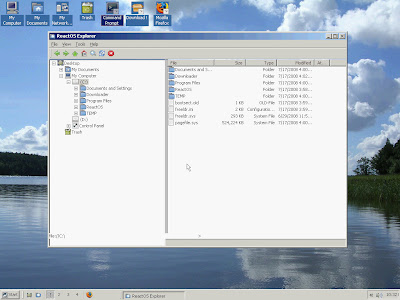
Download! You can install programs using this interface. Very similar to Ubuntu's package manager. You can change the software source is required. There are a few useful applications available like utorrent, Firefox, Abiword etc.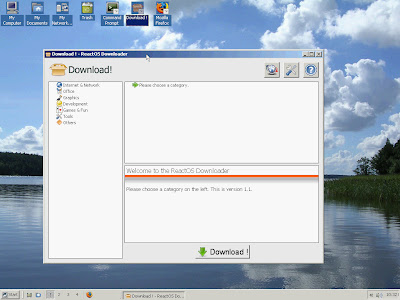
Firefox in action. Notice the weird colour on the browser buttons.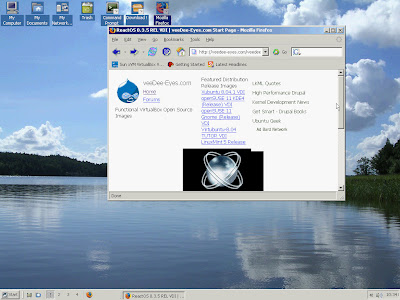
And the Blue Screen of Death!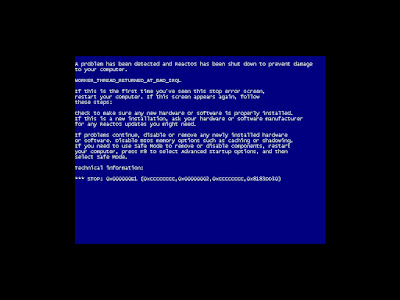
Belenix is an open source operating system based on OpenSolaris. I have been lurking around the Belenix mailing list for a couple of months and it is heartening to see some serious development taking place. The primary attraction was that its a FOSS project from India with a steady development. Secondly, I am curious about OpenSolaris and wanted to see it in action.
Belenix 7.1 was released on July 19. I downloaded an iso only to see it ruined with some checksum errors. Blame it on the acute power shortage leading to constant disruption. Torrent was too slow. Then I chanced upon Vee Dee Eyes. The weird name is the sweetening of vdi, the virtual machine format used by Virtual Box. I was intending to run Belenix from a VM, so I proceeded to download it. Download finished yesterday and I sneaked in a couple of minutes with the system. Really nice to see a fully functional OS and I really liked the KDE implementation. I haven't used KDE for a long time, except for test driving KDE 4.0 from my Ubuntu, which was fairly disappointing. Belenix also includes the latest version of Firefox.
As I mentioned, I only gave it for a very small spin, but the first impression was pretty good. Will give it a grinding and post my experiences. However, a question keeps haunting me. Will this gain traction in an already overcrowded space of open source operating systems? What is the utility of having such a system? I hope to find some answers as we move along!
I ran it at home and found it to be quite a stunner. Though I couldn't fully test it, I plan to do it next week at office.
For the unintiated, virtual appliance is a software solution which contains its on operating system, tweaked for optimal performance. Usually, its designed in such a fashion that the user just needs to run it using a virtual machine application. Database, web server , application server and the like would be configured by the application vendor minimising the need of user intervention.
Virtualisation provides an opportunity for drastic cost reduction. Typical software systems requires a rather lengthy implementation time which involves working at the client site setting up the system. By introducing virtual machines, this phase could well be eliminated or minimised exponentially. Go live period of software projects would become lesser.I foresee a paradigm shift towards virtual appliances in the forseeable future. Not all organisations are comfortable with an SaaS system. But they would still need a cost effective and out of the box solution.
With increase in system power may be even a complicated billing system could be virtualised. Billing system implementation typically takes up a lot of time and cost of support personnel could become prohibitive. By taking the virtual appliance route, the system provider and the client could make significant monetary gains.
Several virtual machine applications are available like VMWare, VirtualBox, VirtualIron. I have used VMWare and VirtualBox, and found VirtualBox to be easier owing to the fact that it is easier to install in Ubuntu. VMWare is little more tricky to install in Ubuntu, sometimes you wish they just provided a deb. Usability wise, both are pretty good and easy to use. For more information check the hyperlinks. If you are interested in virtual appliances, be sure to check out JumpBox, they provide a large number of virtual appliances for applications ranging from CRM to CMS.
Number of IT systems in an enterprise is growing every day. The IT team in many organisations are typically consists of grumpy guys who everybody loves to hate. From their point of view, they do a lot of work, but are underpaid and worse, hated. The cost of maintaining disparate systems take the toll on the administrators and in turn on the organisations. Typically, the route taken is to recruit additional staffing. But, in most cases staffing can only alleviate the problem to a certain level. So, what is the solution?
Outsourcing is a rather hated term in the west. But a concept similar to that would be the solution to the problem, SaaS. In SaaS, there are application vendors that provide IT solutions over the Internet. In other words, you outsource your IT system management to another company. For example, Google Apps. Google Apps provide mail solutions, messenger service, wiki like systems, and even a functional office suite. All over the Internet. The servers would be hosted by Google. The enterprise employees just needs to log in to the system, to use it. No more cursing administrators and peace of mind for the IT team!
Things are not exactly rosy though. You need to have seamless Internet connectivity, which anyway is a rather mandatory requirement for any modern enterprise. But the major concern is that privacy. Will the service provider scan our data and steal business secrets? This would be the primary concern. Trust seems to be the cornerstone here. Also, well drafted agreement would provide peace of mind.
SaaS has grown in popularity over the short period of time. Google Apps is steadily growing. Zoho seems to be doing well with their offerings. Zimbra has several hosted customers. SaaS seems to be the way of future. A doubt I have in mind is regarding the usage of such services in a financial institution, where privacy is paramount and customers are often paranoid.
Taking a break. A pretty big thing has turned up which needs a lot of attention. Will be back with my (in)frequent posts!

Social bookmarking tool is an essential tool to any information junkie.
What does it do basically?
You browse a lot of sites. Read a lot of articles. Sometimes you find an interesting article and bookmark it using your browser for future reading. Bookmarks get accumulated overtime and becomes a pain to manage (Although Firefox 3 has an excellent bookmarking system). If you are a good bookmarking manager, this scenario works out well enough for you (enter Firefox 3 bookmarking again! I love it basically!). But, what if you browse the web using different computers? Your bookmarks gets scattered. A social bookmarking tools becomes a priceless tool in this case. In addition to portability, these tools provide a social angle to your experience. You can share your stuff with your friends. They do a whole lot other things too, but being a social bookmarking virgin (!), yours truly is truly ignorant off.
The main player is Del.icio.us. There are a whole lot of other tools as well: Furl, Magnolia etc. I tried my hand at Delicious when it launched, but didn't the UI and stopped using it in Day 1 itself. Furl survived for 2-3 days at most. Most importantly, even though I loved the concept, I was never enthusiastic about any of these services. Stumbleupon is another
bookmarking like tool, but I usually use it stumble upon webpages when
I am bored. Lets say its like a page rating and recommendation tool,
rather than a genuine bookmarking tool. Digg, Reddit, and Mixx are considered as social bookmarking sites, but I would classify them as social news sites rather due to their unique positioning. I surf both Digg and Reddit regularly.
Yesterday, I came upon a mashup made in Diigo, based on the Twitter Story Contest by Copyblogger. It was very useful since it was pain checking the 200 odd entries through Twitter. Today I went through the wikipedia entry for Diigo. Went through a nightmare of a review from Mashable and a glowing review from TechCrunch. To be frank, I was bowled by the feature set. You can bookmark, you comment on various webpages, you can highlight and save certain portions of the webpages, you can share your bookmarks and comments or choose not to do so, Twitter the same stuff, and a whole lot more. A nice interface adds to the experience. To experience the complete power, you need to install the toolbar. Believe me, its worth it!
I have finally found the bookmarking tool I was missing critically. Happy. My salute goes to the developers for thinking like me while making this tool.
You can find me at Diigo here.

